
FAQ: TBarCode Office Word Add-In
Mail Merge Errors
Mail Merge Errors
Mail Merge Stops After Two Records with TXT or CSV Datasource
Solution: The data-file for the mail merge must be connected as "OLE DB Datasource".
Connect your data-file with Select Recipients and select your text or CSV file. In the Confirm Data Source dialog, select "OLE DB Database Files" and click OK.
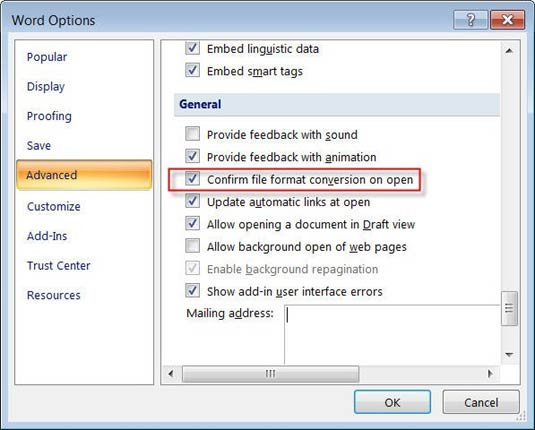
If the Confirm Data Source dialog does not appear you have to enable it in the Word Options. Go to Word Options | Advanced | General and activate the option "Confirm file format conversion on open". Then reconnect your data as described above (without attaching the data source again, the option may not be applied).
Fatal Error at MailMergeDataField.get_Value()
Access MDB Data Source: Please verify the table fields in your data source. The error can appear if a field name contains more than 32 characters. As a solution rename the fields in your import table or create a view with renamed fields.
Wrong Page Numbers in the Barcode
If your mail merge bar code references fields or document properties containing page numbers, wrong values can be read.
The behavior is caused by the internal update order in Word. It may occur that the bar code is created/drawn before the page numbers have been calculated (and an old value is read). Unfortunately we have no influence on this problem.