
FAQ Barcode Studio
Font for EPS and AI Is Replaced or Not Displayed
Font for EPS and AI Is Replaced or Not Displayed
For EPS export, a standard font is chosen unless you set an appropriate PostScript font in the options (you can also set a TrueType font as long as the name is EPS-compliant). The reason for this is that we do not embed the font directly, but only "reference" it - and here a valid font name must be ensured in the EPS.
What should I bear in mind regarding font selection for AI and EPS export?
By default, only certain standard fonts (e.g. Helvetica, Times New Roman, Courier etc.) can be referenced in the EPS/AI export - this ensures that the font is supported by the printer and/or can be rendered by the PostScript engine. In certain cases, the font name is replaced by Helvetica (EPS) or ArialMT (AI) in the export - namely if the font name cannot be referenced (e.g.: if it contains a space).
Barcode Studio font replacement options:
- If font substitution is disabled in the options, either a default font (compatible with the output format) or the set font (if it does not contain a space) is chosen as the font. The EPS/AI renderer then tries to load the specified font. If the font is not found, it is either replaced or not rendered.
- When replacing the font in Barcode Studio, the valid (complete) font name is required, this can be e.g. "GothamBold" or "Gotham-Bold" (often different from the name displayed in the dialogue). It is necessary to find out the correct font name for EPS or AI, especially if you use a TrueType font: The name displayed differs from the actual font name in the font file and there are also different names for the PostScript variant. For some fonts it is even impossible to refer to them, namely if they contain spaces in the font name.
The reason for these limitations is that Barcode Studio does not embed the fonts completely, but only references them. The reference name to the font must fulfil the criteria prescribed by the respective format (EPS, API).
AI - Trouble Shooting:
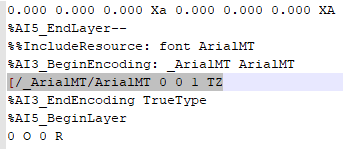
If you open the exported AI file with a text editor, you can see under which name the font is actually referenced (towards the end of the file). For example, Arial is referenced as ArialMT. This is because Arial exists under Postscript as ArialMT. See also: Difference between Arial and Arial MT.
Certain font names are automatically converted to PS-compatible names, but only the common ones (as we do not know and cannot cover all fonts on the market). This is exactly why there is the font setting in the options where you can specify the actual font for the export file (important - EPS compatible name, no spaces).